Create Panel Sets
Create panel sets by selecting nodes/elements and/or existing node/element sets in the model file in the prepare module mode. These panels are automatically used in setting up Panel Participation and ERP diagnostic output in NVH analysis.
-
From the Analyse ribbon, click the Panels tool.

Figure 1.To add a panel set, the module enters into prepare mode.
A guide bar opens. -
Click the satellite icon
 that appears when you hover over the Panels tool to review panel sets in the
Panel Sets browser.
You can also rename the panel sets and set the type for panel participation (PFP) and ERP using the checkbox options available for each panel set.
that appears when you hover over the Panels tool to review panel sets in the
Panel Sets browser.
You can also rename the panel sets and set the type for panel participation (PFP) and ERP using the checkbox options available for each panel set.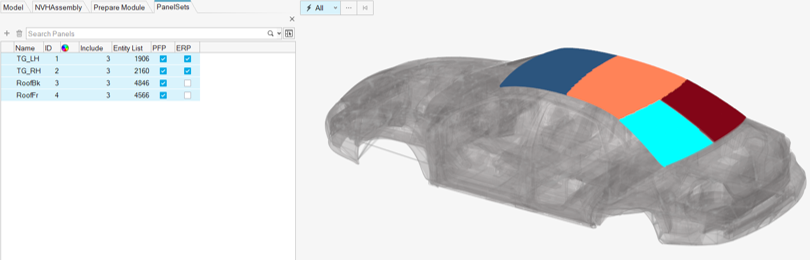
Figure 2.